PUBG Mobile has grown by leaps and bounds with over 50 million daily active players on the platform. Taking out enemies on your phone and getting that chicken dinner is the way PUBG Mobile is meant to be played, there’s also an official alternative to do the same on a PC or a laptop which is available at steam as PUBG PC (Which is in app purchase ) . If you are of the kind that is more comfortable with a keyboard-mouse combo or if you can't afford the PUBG PC or a high end Gaming Pc but still wish to play PUBG then you can also play the mobile game on your PC .
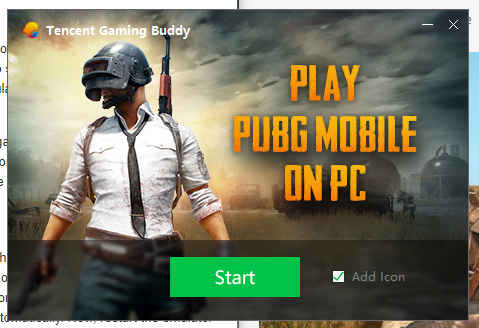
1) Download and install official Tencent Gaming Buddy Emulator
2) Run the emulator and it will download game files on its own
3) Change the emulator's language, if required
4) Run PUBG and download additional game files
5) Play and win that chicken dinner!
To play PUBG Mobile on your PC, one needs to download the official Tencent Gaming Buddy Emulator from the right place .Because all sites providing software are not safe but don't worry I'll put the download link below .
There’s also BlueStacks app for emulating the game on a computer, but the Gaming Buddy Emulator is simpler to set-up. Head over to the website and download the emulator The emulator setup installer is around 9MB in size but it serves as an intermediate package to download the additional files needed to install the entire game.
Once downloaded, double click on the downloaded file to run the installer. Select the destination where you want the game to be installed and hit install. After installation, a new window will open up which will show you download progress of the additional files that the emulator requires to get the title up and running.
When booted up, the emulator will show PUBG Mobile icon and clicking on it will boot up the game. It will then download additional files required to run the game. This process is equivalent to the OBB files being downloaded on a phone when PUBG Mobile is booted for the first time. Let the game download files, ( You have to grant access to storage for the game to download files )
In case the Gaming Buddy Emulator is installed on another PC, you can copy the same files to your laptop/PC to skip the wait. To do this, head over to the ‘Temp’ folder on the drive where the emulator is installed , and copy the ‘TxGameDownload’ folder on a flash drive, which is around 2GB in size. Now, paste this folder in the same ‘Temp’ directory on the PC where the emulator is yet to download the files, the emulator will detect and verify the files, and boot up the game directly to the login screen.
However, this second method requires a computer where the Gaming Buddy Emulator is already set up and the game is up and running. In case there’s no such provision, let the game download additional files. After files are downloaded, the game will boot up and from there on, it’s similar to how the game behaves on mobile phones. As you are using an emulator, it will show a notice that the user will only be paired with other users that are also playing the game on a PC. However, there is no such restriction and one will be able to team up with their friends that are playing the game on their phones.
Now the game will automatically launch for the first time loading . All you have to do then is agreeing to Terms and Conditions and Privacy Policy and Sign Up or Login using Facebook or Google Play Games id (if You have previously logged in the game ) or you can simply play as guest .
Controls are as default for a shooting game
WASD for movement , RMB to aim LMB to shoot , c/z to crouch Prone ,F to pickup ,
1 2 3 4 ... assign these no. to your melees or grenades . Now let the action begin

One thing to remember whenever you are playing in emulator a message will pop up like these .

But don't be afraid I myself paired with my mate who plays in mobile and i was in Emulator so if you can't pair into the lobby keep trying : )
So now go forth to get that chicken dinner. Happy gaming ; )
If you loved the article share with your friends to play together .
Here’s how to do so:
1) Download and install official Tencent Gaming Buddy Emulator
2) Run the emulator and it will download game files on its own
3) Change the emulator's language, if required
4) Run PUBG and download additional game files
5) Play and win that chicken dinner!
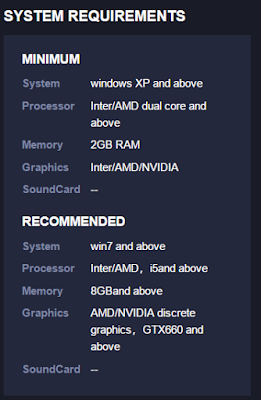
System Requirements :

The Process :
To play PUBG Mobile on your PC, one needs to download the official Tencent Gaming Buddy Emulator from the right place .Because all sites providing software are not safe but don't worry I'll put the download link below .
There’s also BlueStacks app for emulating the game on a computer, but the Gaming Buddy Emulator is simpler to set-up. Head over to the website and download the emulator The emulator setup installer is around 9MB in size but it serves as an intermediate package to download the additional files needed to install the entire game.
Once downloaded, double click on the downloaded file to run the installer. Select the destination where you want the game to be installed and hit install. After installation, a new window will open up which will show you download progress of the additional files that the emulator requires to get the title up and running.
SETTINGS TO BE DONE :
When booted up, the emulator will show PUBG Mobile icon and clicking on it will boot up the game. It will then download additional files required to run the game. This process is equivalent to the OBB files being downloaded on a phone when PUBG Mobile is booted for the first time. Let the game download files, ( You have to grant access to storage for the game to download files )
In case the Gaming Buddy Emulator is installed on another PC, you can copy the same files to your laptop/PC to skip the wait. To do this, head over to the ‘Temp’ folder on the drive where the emulator is installed , and copy the ‘TxGameDownload’ folder on a flash drive, which is around 2GB in size. Now, paste this folder in the same ‘Temp’ directory on the PC where the emulator is yet to download the files, the emulator will detect and verify the files, and boot up the game directly to the login screen.
However, this second method requires a computer where the Gaming Buddy Emulator is already set up and the game is up and running. In case there’s no such provision, let the game download additional files. After files are downloaded, the game will boot up and from there on, it’s similar to how the game behaves on mobile phones. As you are using an emulator, it will show a notice that the user will only be paired with other users that are also playing the game on a PC. However, there is no such restriction and one will be able to team up with their friends that are playing the game on their phones.
The Game Play :
Now the game will automatically launch for the first time loading . All you have to do then is agreeing to Terms and Conditions and Privacy Policy and Sign Up or Login using Facebook or Google Play Games id (if You have previously logged in the game ) or you can simply play as guest .
Controls are as default for a shooting game
WASD for movement , RMB to aim LMB to shoot , c/z to crouch Prone ,F to pickup ,
1 2 3 4 ... assign these no. to your melees or grenades . Now let the action begin

One thing to remember whenever you are playing in emulator a message will pop up like these .

But don't be afraid I myself paired with my mate who plays in mobile and i was in Emulator so if you can't pair into the lobby keep trying : )
So now go forth to get that chicken dinner. Happy gaming ; )
If you loved the article share with your friends to play together .