Showing posts with label Programming. Show all posts

Wednesday, May 20, 2020

How To Play PUBG Mobile On PC

PUBG Mobile has grown by leaps and bounds with over 50 million daily active players on the platform. Taking out enemies on your phone and getting that chicken dinner is the way PUBG Mobile is meant to be played, there’s also an official alternative to do the same on a PC or a laptop which is available at steam as PUBG PC (Which is in app purchase ) . If you are of the kind that is more comfortable with a keyboard-mouse combo or if you can't afford the PUBG PC or a high end Gaming Pc but still wish to play PUBG then you can also play the mobile game on your PC .



Here’s how to do so:


1) Download and install official Tencent Gaming Buddy Emulator

2) Run the emulator and it will download game files on its own

3) Change the emulator's language, if required

4) Run PUBG and download additional game files

5) Play and win that chicken dinner!
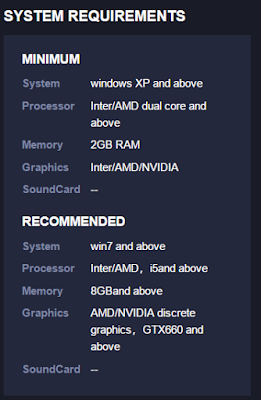


System Requirements :


The Process :


To play PUBG Mobile on your PC, one needs to download the official Tencent Gaming Buddy Emulator from the right place .Because all sites providing software are not safe but don't worry I'll put the download link below .

There’s also BlueStacks app for emulating the game on a computer, but the Gaming Buddy Emulator is simpler to set-up. Head over to the website and download the emulator The emulator setup installer is around 9MB in size but it serves as an intermediate package to download the additional files needed to install the entire game.

Once downloaded, double click on the downloaded file to run the installer. Select the destination where you want the game to be installed and hit install. After installation, a new window will open up which will show you download progress of the additional files that the emulator requires to get the title up and running.


SETTINGS TO BE DONE :


When booted up, the emulator will show PUBG Mobile icon and clicking on it will boot up the game. It will then download additional files required to run the game. This process is equivalent to the OBB files being downloaded on a phone when PUBG Mobile is booted for the first time. Let the game download files, ( You have to grant access to storage for the game to download files )


In case the Gaming Buddy Emulator is installed on another PC, you can copy the same files to your laptop/PC to skip the wait. To do this, head over to the ‘Temp’ folder on the drive where the emulator is installed , and copy the ‘TxGameDownload’ folder on a flash drive, which is around 2GB in size. Now, paste this folder in the same ‘Temp’ directory on the PC where the emulator is yet to download the files, the emulator will detect and verify the files, and boot up the game directly to the login screen.


However, this second method requires a computer where the Gaming Buddy Emulator is already set up and the game is up and running. In case there’s no such provision, let the game download additional files. After files are downloaded, the game will boot up and from there on, it’s similar to how the game behaves on mobile phones. As you are using an emulator, it will show a notice that the user will only be paired with other users that are also playing the game on a PC. However, there is no such restriction and one will be able to team up with their friends that are playing the game on their phones.


The Game Play :


Now the game will automatically launch for the first time loading . All you have to do then is agreeing to Terms and Conditions and Privacy Policy and Sign Up or Login using Facebook or Google Play Games id (if You have previously logged in the game ) or you can simply play as guest .

Controls are as default for a shooting game

WASD for movement , RMB to aim LMB to shoot , c/z to crouch Prone ,F to pickup ,

1 2 3 4 ... assign these no. to your melees or grenades . Now let the action begin


One thing to remember whenever you are playing in emulator a message will pop up like these .


But don't be afraid I myself paired with my mate who plays in mobile and i was in Emulator so if you can't pair into the lobby keep trying : )

So now go forth to get that chicken dinner. Happy gaming ; )


If you loved the article share with your friends to play together .

Thursday, May 7, 2020

PROJECT EULER SOLUTION MULTIPLES OF 3 & 5

SOLUTION TO THE PROBLEM GIVEN IN PROJECT EULER PROBLEM NO 2 ---Multiples of 3 and 5


ALGORITHM :

Get MULTIPLES of 3 and5 up to the NO given, SUPPOSE x in the CODE given below and ADD them until it CROSSES THE NO x . Now taking MULTIPLES of both 3 and 5 includes taking multiples of 15 twice times , one for 3's multiple and the other for 5's multiple. so we have to subtract the multiples of 15 until it crosses the number x


SOLUTION :


#include <bits/stdc++.h>using namespace std;

long long int Sum_Divisor(long long int n){
    //long long int i=1;    long long int sum =0;
    for (long long int i = 1; i < n/2; ++i) {
        if (3*i < n)
            sum=sum+3*i;
        if (5*i < n)
            sum=sum+5*i;
        if (3*5*i < n)
            sum=sum-3*5*i; // subtract the multipes of 15     }
    cout<<sum;
}

int main()
{
    long long int x;
    cin>>x; 
    Sum_Divisor(x);
}


for the above QUESTION IN EULER PROJECT x = 1000 , and the ans is  233168 .

Friday, April 3, 2020

C/C++ PATTERNS

Today we will see how to print square box type patterns (SOLID)


PROBLEM 1 : 

the code goes here

#include<iostream>
using namespace std;
int main()
{
int i,j,n=6;
for(i=1;i<=n;i++)
{
for(j=1;j<=n;j++)
{
cout<<" "<<"*";
}
cout<<endl;
}
}


PROBLEM 2 : 


the code goes here


#include<iostream>
using namespace std;
int main()
{
int i,j,n=6;
for(i=1;i<=n;i++)
{
for(j=1;j<=n;j++)
{
cout<<" "<<i;
}
cout<<endl;
}
}


PROBLEM 3 :  


the code goes here


#include<iostream>
using namespace std;
int main()
{
int i,j,n=6;
for(i=1;i<=n;i++)
{
for(j=1;j<=n;j++)
{
cout<<" "<<j;
}
cout<<endl;
}
}


PROBLEM 4 : 


the code goes here


#include<iostream>
using namespace std;
int main()
{
int i,j,n=6;
for(i=1;i<=n;i++)
{
for(j=1;j<=n;j++)
{
cout<<" "<<6-i;
}
cout<<endl;
}
}


PROBLEM 5 : 


the code goes here


#include<iostream>
using namespace std;
main()
{
char i,j;
for(i='A';i<='F';i++)
{
for(j='A';j<='F';j++)
{
cout<<" "<<char(i);
}
cout<<endl;
}
}


PROBLEM 8 : 


the code goes here


#include<iostream>
using namespace std;
main()
{
char i,j;
for(i='A';i<='F';i++)
{
for(j='A';j<='F';j++)
{
cout<<" "<<char(j);
}
cout<<endl;
}
}


PATTERN PRINTING IN C & C++


To print a pattern E of n rows we  print an E with n+1/2 "*" 's at 1st and last row Nd n-1/2 "*" 's at middle

for C++ the code goes here ----------------


#include<iostream>
using namespace std;
int main()
{
int i,j,n;
cout<<"No of Rows : ";
cin>>n;
for(i=1;i<=n;i++)
{
if(i==1 || i==n)
{
for(j=1;j<=(n+1)/2;j++)
{
cout<<"*";
}
cout<<"\n";
}

    else if (i==((n+1)/2))
{
for(j=1;j<=(n-1)/2;j++)
{
cout<<"*";
}
cout<<"\n";
}
else
{
cout<<"*\n";
}

}

}


like this.....


if you run this code with n = 15 then no of row will be 15 ,at 1st line and 15 th line no of "*" will be 
15+1/2=8  and at the middle no of "*" will be 15-1/2 = 7 , like this 


similar code goes for  C 


#include<stdio.h>
#include<conio.h>
int main()
{
int i,j,n;
printf("No of Rows : ",n);
scanf("%d",&n);
for(i=1;i<=n;i++)
{
if(i==1 || i==n)
{
for(j=1;j<=(n+1)/2;j++)
{
printf("*");
}
printf("\n");
}
    else if (i==((n+1)/2))
{
for(j=1;j<=(n-1)/2;j++)
{
printf("*");
}
printf("\n");
}
else
{
printf("*\n");
}
}
}


Share on Whatsapp

Wednesday, April 1, 2020

DATA-TYPES & THEIR USAGE


C++ Data Types


Data types are means to identify the type of data and associated operations of handling it. There are three types of data types:


  1. Pre-defined DataTypes
  2. Derived Data Types
  3. User-defined DataTypes


 Pre-defined DataTypes:


    These data types are built-in or predefined data types and can be used directly by the user to declare variables. example: int, char , float, bool etc. Primitive data types available in C++ are:

    1.      Integer
    2.      Character
    3.      Boolean
    4.      Floating Point
    5.      Double Floating Point
    6.      Valueless or Void
    7.      Wide Character


    Derived Data Types: 


    The data-types that are derived from the primitive or built-in datatypes are referred to as Derived Data Types. These can be of four types namely:

    1.      Function
    2.      Array
    3.      Pointer
    4.      Reference

    Abstract or User-Defined Data Types:


     These data types are defined by user itself. Like, defining a class in C++ or a structure. C++ provides the following user-defined datatypes:

    1.      Class
    2.      Structure
    3.      Union
    4.      Enumeration
    5.      Typedef defined DataType

    In this article, the Pre-defined DataType is explained:


    There are five data types in the C subset: character, integer, floating-point,
    double floating-point, and valueless (char, int, float, double, and void, respectively).
    To the five basic data types defined by C, C++ adds two more: bool and wchar_t.
    The exact format of floating-point values will depend upon how they are implemented.
    Integers will generally correspond to the natural size of a word on the host computer.
    Values of type char are generally used to hold values defined by the ASCII character
    set. Values outside that range may be handled differently by different compilers.
    The range of float and double will depend upon the method used to represent
    the floating-point numbers. Whatever the method, the range is quite large.

    The typical sizes are mentioned below


    Or you can run this code:

    #include<iostream>
    using namespace std;
     
    int main()
    {
        cout << "Size of char : " << sizeof(char) 
          << " byte" << endl;
        cout << "Size of int : " << sizeof(int)
          << " bytes" << endl;
        cout << "Size of short int : " << sizeof(short int) 
          << " bytes" << endl;
        cout << "Size of long int : " << sizeof(long int) 
           << " bytes" << endl;
        cout << "Size of signed long int : " << sizeof(signed long int)
           << " bytes" << endl;
        cout << "Size of unsigned long int : " << sizeof(unsigned   long int) 
           << " bytes" << endl;
        cout << "Size of float : " << sizeof(float) 
           << " bytes" <<endl;
        cout << "Size of double : " << sizeof(double) 
           << " bytes" << endl;
        cout << "Size of wchar_t : " << sizeof(wchar_t) 
           << " bytes" <<endl;
         
       
    }
    Like this


    Then you will see an output like this


    DataTypes and their forms


    1.   Integer: Keyword used for integer data types is int.
    2.   Character: Character data type is used for storing characters. Keyword used for character data type is char.
    3.   Boolean: Boolean data type is used for storing boolean or logical values. A boolean variable can store either true or false. Keyword used for boolean data type is bool.
    4.   Floating Point: Floating Point data type is used for storing single precision floating point values or decimal values. Keyword used for floating point data type is float.
    5.   Double Floating Point: Double Floating Point data type is used for storing double precision floating point values or decimal values. Keyword used for double floating point data type is double..
    6.   void: Void means without any value. void datatype represents a valueless entity. Void data type is used for those function which does not returns a value.
    7.   Wide Character: Wide character data type is also a character data type Represented by wchar_t.

    Modifying the Basic Types


    Except for type void, the basic data types may have various modifiers preceding them.
    You use a modifier to alter the meaning of the base type to fit various situations more
    precisely. The list of modifiers is shown here:

    signed
    unsigned
    long
    short

    You can apply the modifiers signed, short, long, and unsigned to integer base types.
    You can apply unsigned and signed to characters. You may also apply long to double.
    The use of signed on integers is allowed, but redundant because the default integer
    declaration assumes a signed number. The most important use of signed is to modify
    char in implementations in which char is unsigned by default.
    The difference between signed and unsigned integers is in the way that the high order
    bit of the integer is interpreted. If you specify a signed integer, the compiler
    generates code that assumes that the high-order bit of an integer is to be used as a
    sign flag. If the sign flag is 0, the number is positive; if it is 1, the number is negative.
    In general, negative numbers are represented using the two's complement approach,
    which reverses all bits in the number (except the sign flag), adds 1 to this number, and
    sets the sign flag to 1.
    Signed integers are important for a great many algorithms, but they only have half
    the absolute magnitude of their unsigned relatives. For example, here is 32,767:
    0 1 1 1 1 1 1 1 1 1 1 1 1 1 1 1
    If the high-order bit were set to 1, the number would be interpreted as −1. However,
    if you declare this to be an unsigned int, the number becomes 65,535 when the high order
    bit is set to 1.
    See here 

    check the values at that website mentioned above :

    -32767                                               1000000000000001                                   
    -65535                                               10000000000000001
     32767                                               0111111111111111
     65535                                               01111111111111111

    Hope that helps, its two’s compliment method for binary conversion

    Declaration of variables

    C++ is a strongly-typed language, and requires every variable to be declared with its type before its first use. This informs the compiler the size to reserve in memory for the variable and how to interpret its value.: we simply write the type followed by the variable name . For example:

    1.      int a;
    2.      float mynum;


    The first one declares a variable of type int with the identifier a. The second one declares a variable of type float with the identifier mynum. Once declared, the variables a and mynum can be used within the rest of their scope in the program.
    If declaring more than one variable of the same type, they can all be declared in a single statement by separating their identifiers with commas. For example:


    int a, b ;

    This declares three variables (a, b), all of them of type int, and has exactly the same meaning as:
    1             int a;

    2             int b;


    if you run this code


    String Constants


    C/C++ supports one other type of constant: the string. A string is a set of characters
    enclosed in double quotes. For example, "this is Science Geek" is a string.
    . Although C allows you to define string constants, it does not formally have a string data type.
    (C++ does define a string class, however.)
    You must not confuse strings with characters. A single character constant is enclosed in single quotes, as in 'a'. However, "a" is a string containing only one letter. in single quotes, as in 'a'. However, "a" is a string containing only one letter     


    if you run this the result will be like this


    Backslash Character Constants


    Enclosing character constants in single quotes works for most printing characters. A
    few, however, such as the carriage return, are impossible to enter into a string from the
    keyboard. For this reason, C/C++ include the special backslash character constants shown  
        
    THANK YOU !! PLEASE DO SHARE THIS POST


    Share on Whatsapp